.jpg)
.svg)
.png)
.png)

.svg)
.svg)
.svg)
.svg)
LinkedIn Activity Score Tool (Boost Reply Rates 1.5×–3×)
Most outbound teams lose time and credits messaging prospects who barely use LinkedIn. And with 500–5,000 leads, manually checking activity is impossible — traditional tools don’t show who actually logs in or engages.
Yet targeting active LinkedIn users increases reply rates by 1.5× to 3× across industries. It’s the easiest performance win without changing your ICP or messaging.
This guide shows a quick workflow to filter for active LinkedIn profiles in minutes using crona.ai, so your outreach focuses only on people who will actually respond.
What you need to start
A CSV where one of the columns contains LinkedIn profile URLs
Step-by-step instructions
Step 1 — Sign up and create a new project in Crona.ai
- Sign up in Crona https://app.crona.ai/sign-up (you get 1000 free credits)
- Create a new project
- Upload your CSV
- Make sure the column with LinkedIn URLs is correctly detected and named (for example,
linkedin)
One row = one person.
Step 2 — Add the “LinkedIn Activity Score” enricher
Click Add Enricher → LinkedIn Activity Score.
In the input field:
- Select the column that contains the profile URLs → for example
linkedin
Now click the Play button to run it.
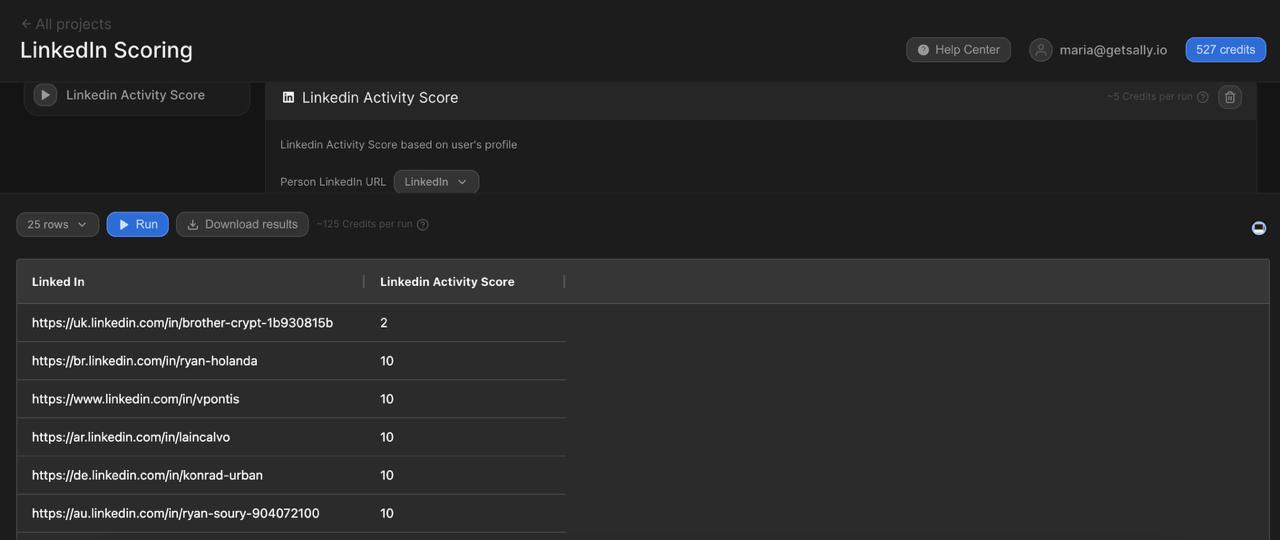
That’s it — no extra configuration required.
How “LinkedIn Activity Score” enricher works
This enricher gives every LinkedIn profile in your CSV a 0–10 activity score.
You only select the column with LinkedIn URLs — Crona handles everything else automatically.
Here’s what it does under the hood:
1. It checks the person’s LinkedIn network
Crona looks at publicly available network signals, such as:
- how many connections they have
- how many followers they have
These numbers help determine whether the person is actually present on LinkedIn.
2. It checks how recently the person posted
The enricher fetches the person’s last few public posts and detects:
- when the last post was published
- how active the person is overall
Someone who posted 5 days ago is much more reachable than someone who hasn’t posted in a year.
3. It combines all signals into a single score
Using those two inputs — network size + recent activity — Crona assigns a score:
Score 10 — Ideal
500+ connections, last post <7 days. Very high engagement.
Score 9 — Excellent
400–500 connections (or 200+ followers), last post <14 days.
Score 8 — Very Good
300–400 connections, last post <30 days.
Score 7 — Good
200–300 connections, last post <60 days.
Score 6 — Above Average
150–200 connections, last post <90 days.
Score 5 — Average
100–150 connections, last post <120 days.
Score 4 — Below Average
75–100 connections, last post <180 days.
Score 3 — Weak
60–75 connections, last post <270 days.
Score 2 — Very Weak
50–60 connections, last post <365 days.
Score 1 — Barely Viable
50+ connections, no posts for 1+ year.
Score 0 — Not Viable
<50 connections. Posting activity doesn't matter — network too weak.
This helps you instantly filter out people who are unlikely to respond to outreach.
Step 3 — Filter and export
Now you have a LinkedIn Activity Score for each profile and can stop guessing.
Typical filters:
- 9–10 → top tier: add to your best-performing sequences
- 7–8 → good targets: keep in core outbound
- 5–6 → optional: send into slower / nurture flows
- 0–2 → cold/dormant: usually remove from LinkedIn outreach
You can:
- filter inside Crona (e.g. keep
activityScore >= 7), - or export the table and filter in your CRM / Google Sheets.
This way you don’t waste your outreach capacity on people who haven’t been on LinkedIn in a year.
Use cases
Outbound & SDR teams
Quick way to clean lists and remove obviously dead profiles before uploading to your outreach tool.
BD and partnerships
Focus on operators who actually check LinkedIn and respond, instead of spraying messages across inactive accounts.
Investor & advisor research
Check whether senior profiles are active enough to justify a cold reach-out.
Conference lead lists
Most conference exports are noisy. Layering Activity Score helps focus on people who are present both at the event and on LinkedIn.
ICP segmentation
Some segments are naturally more active on LinkedIn (B2B SaaS, GTM, marketing). Scoring helps route these contacts to higher-priority plays.
FAQ
How does the LinkedIn Activity Score enricher work?
It takes a LinkedIn URL, checks the publicly visible connections, followers, and recent posts, and returns a single score from 0 to 10 that reflects how active the person is on LinkedIn.
What does the score represent?
It’s a quick proxy for responsiveness.
People who are active on LinkedIn are far more likely to see and reply to messages.
Do I need multiple enrichers to calculate this score?
No.
Everything — connections, followers, posting activity, and the scoring logic — is bundled into one step.
What input do I need?
A CSV file in which one of the columns contains LinkedIn profile URLs.
Does Crona access private data?
No.
Only publicly available LinkedIn information is used (network size, visible posts, and timestamps).
What if the profile has no posts?
If a profile has never posted or the posts are not publicly visible, the system treats it as very low activity, which leads to a lower score.
Why do profiles with fewer than 50 connections get a score of 0?
Accounts with extremely small networks almost never respond to outbound messages, regardless of posting activity. This threshold is intentional.
Can I use this for thousands of rows?
Yes.
The enricher is built for bulk scoring and works the same regardless of dataset size.
Can I run this step-by-step instead of running the entire workflow?
Yes. You can click the Play button next to the enricher to run only this step and preview results before scaling.
Can I rename the output column?
Yes. In the left sidebar, you can rename any step to keep your workflow tidy.
Column names don’t affect the logic.
.svg)


.svg)
.png)

